

Description
AutoBlog Writer Pro is the exact n8n content pipeline we run on our own site — a 67-node workflow that takes a topic from a content calendar to a fact-checked, formatted, SEO-optimized blog post with zero manual writing.
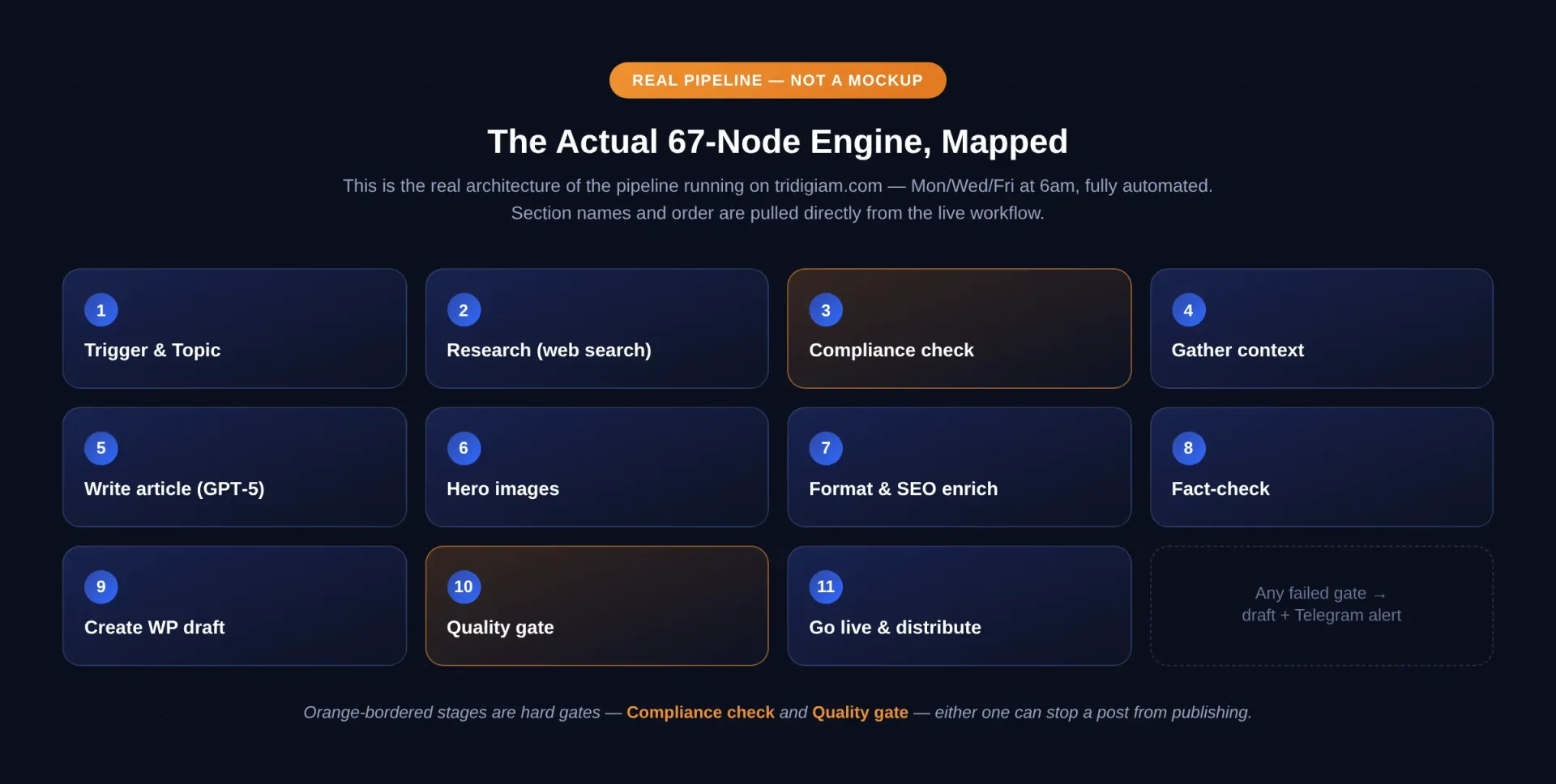
The real 11-stage pipeline architecture, pulled directly from the live workflow — not a mockup.
Built in-house, not outsourced. This comes from the same automation stack we run inside Tridigiam’s own agency operations, packaged for resale — instant download after purchase, setup guide included, single-site-use license, one-time purchase (no subscription).
Buying more than one template? Use code BUNDLE20 at checkout for 20% off orders of $450 or more across any of our Agency Automation Templates.
Who this is for
Agencies and content teams already publishing on a real content calendar who want to remove the manual-writing bottleneck without sacrificing quality control. This is not a one-click “generate a blog post” toy — it’s a production pipeline with real QA gates, built for teams that already care about internal linking, fact accuracy, and structural SEO.
What it does
- Pulls the next topic from your content calendar (Google Sheets)
- Researches the subtopics that need coverage
- Writes a full article with GPT-5 — key-takeaways section, proper heading structure, a sources section pulled from real cited URLs
- Optimizes title and meta description for CTR
- Fact-checks itself against two independent sources
- Publishes to WordPress
- A companion distribution workflow posts it to your social channels automatically
Built-in guardrails
A structural QA gate blocks posts that fail on title/meta length, missing alt text, thin internal linking, or a missing comparison table — failed posts sit as a draft with a Telegram alert instead of going live broken. Fact-checking is non-blocking by design: claims get flagged after publish, not held hostage, so your calendar never stalls.
What’s included
- The writer workflow (64 nodes, fully stripped of our credentials, URLs, and internal references)
- The distribution workflow (15 nodes)
- A setup guide
Setup & requirements
This is our real production engine, not a stripped-down demo — expect a genuine setup investment, not a 15-minute install. The 3-node gap between the 67-node pipeline we run and the 64 nodes you receive is intentional: we strip out our own internal compliance-context lookup and OpenAI cost-logging nodes, since those are tied to our internal systems and aren’t useful to you. You’ll need your own: OpenAI account with GPT-5 and gpt-image-2 access, a WordPress site, a Google Sheets content calendar (template structure in the setup guide), and optionally Postiz and Telegram for the distribution and alerting pieces.
Why buy instead of build
A 67-node production pipeline with fact-checking, structural QA gating, and automated distribution took real iteration to get right — the QA gate rules alone came from watching what actually breaks when you publish AI-written content at scale. This is that finished system, not a starting point you’d have to debug into shape yourself.
Frequently Asked Questions
Will this publish broken or low-quality posts automatically?
No — the structural QA gate blocks anything that fails on title/meta length, missing alt text, thin internal linking, or a missing comparison table. Failed posts sit as a draft with a Telegram alert instead of publishing.
What happens if the fact-check step finds an issue after a post is already live?
Fact-checking is intentionally non-blocking, so it doesn’t stall your calendar waiting on verification. Flagged claims are surfaced after publish so you can review and correct them.
Is this a quick 15-minute install like some of your other n8n tools?
No — this is our actual production content engine, not a stripped-down demo. Expect a genuine setup investment: connecting OpenAI, WordPress, your Google Sheets content calendar, and optionally Postiz and Telegram.
Can I use this on client sites?
Yes, under the single-site-use license — deploy on one live site. Contact us if you need a multi-site license for several client accounts.





Reviews
There are no reviews yet.